
Data export
Export TikTok Research Data
Take the selected videos out of the page and into a CSV or JSON file with configurable fields. Product data can be exported the same way on Pro.
Selection is the source
The export uses the same selected-video set as batch download, so the file and the download queue refer to the same records.
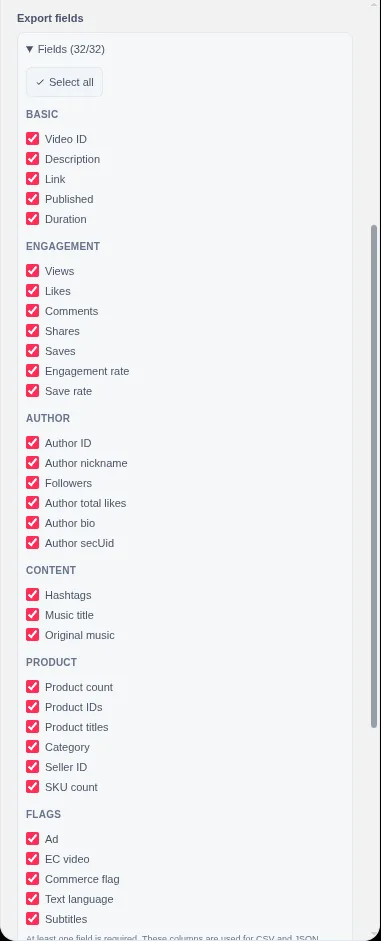
Fields are configurable
Choose the fields you need in Settings. The same selection is used for both CSV and JSON.
Local file output
The extension writes the file locally. There is no upload step and no remote export service.
Field reference
Choose the columns that match your question.
Available fields are grouped in Settings. The same field configuration is used for CSV and JSON.
| Group | Fields |
|---|---|
| Basic | Video ID, description, URL, published time, duration. |
| Engagement | Views, likes, comments, shares, saves, engagement rate, collect rate. |
| Author | Author ID, nickname, followers, total likes, bio, secUid. |
| Content | Hashtags, music title, original-music flag. |
| Product | Product count, IDs, titles, category paths, seller IDs, SKU counts. |
| Flags | Ad, commerce, EC-video, text language, subtitle languages. |
Product export includes product ID, title, category path, seller ID, SKU count, price, currency, source, cover URL, SEO URL, linked video IDs, and occurrence count.
What is included
The selected set, not the whole platform.
TokGrid exports the records you selected from the current filtered candidates, plus selections retained across filter changes.
- Select individual videos, all current filtered candidates, or a retained cross-filter selection.
- Exports from the Data tab or preview use the same selected-video set as batch download.
- Product data export uses the loaded, deduplicated product list.
- No cross-page merge, historical snapshot, or trend calculation is applied.
CSV vs JSON
- CSV
- A flat table with a header row, UTF-8 BOM, and CRLF rows for spreadsheet compatibility. Quoted cells handle commas and line breaks.
- JSON
- An array of objects using stable field names. Useful for scripts, notebooks, or your own database import.
- Missing values
- Missing values are not invented. CSV leaves them blank; JSON uses null where the field has no value.
Workflow
A clean export in five steps.
Build the selection first, then decide on fields and format.
- 1
Define the sample
Use the page and filters that match your research question. Record the page URL and date separately.
- 2
Select the records
Select individual videos or all current filtered candidates. Retained selections survive filter changes.
- 3
Configure fields
Open Settings and choose the export fields. The configuration applies to both CSV and JSON.
- 4
Choose format and export
Export CSV for a spreadsheet or JSON for code. The file is generated locally from the selected records.
- 5
Document the source
Keep the page URL, capture date, and filter settings with the file so the sample can be explained later.
Limits
What export does not do.
Export is a Pro feature. Single-item copying and single video/subtitle downloads remain free.
Only selected videos in the current workflow are included. The extension does not merge data across pages, tabs, or browsing sessions.
Cross-page deduplicated merge and historical snapshots are not available in this version.
The export does not include sales, revenue, advertising spend, or platform-wide statistics.
CSV and JSON contain the fields available for each record. Missing values are blank in CSV and null where appropriate in JSON.
There is no Excel, Google Sheets, or other spreadsheet-service integration. You open or import the file yourself.
FAQ
Data export questions.
Which formats can I export?
TokGrid exports selected video data as CSV or JSON. Product data can also be exported as CSV or JSON. It does not integrate with Excel, Google Sheets, or other spreadsheet services.
Which videos are included in an export?
The export uses the same selected-video set as batch download: selected videos from the current filtered candidates plus selections retained across filters. It does not merge data from other pages or other browser tabs.
Which fields can I include?
Fields cover video basics, engagement metrics, author details, content details, product details, and flags such as ad and commerce status. You can choose fields in Settings, and the selection is used for both CSV and JSON.
Is CSV export Excel-friendly?
The CSV includes a UTF-8 BOM and CRLF rows so that spreadsheet applications can open it more reliably. That is file-format compatibility, not an Excel integration.
Does export require Pro?
Yes. Selected-video CSV/JSON export and product data export are Pro features. Single-item copying and single video/subtitle downloads remain free.
TokGrid
Turn the selected sample into a file you can explain.
Install TokGrid, build a selection on a supported public page, and use Pro export when you need CSV or JSON.