
Social Media Data Intelligence
Turn TikTok Content Into Actionable Insights.
Analyze video performance, research competitors, explore products, and organize public page data — all in your browser.
Research smarter. Understand content. Discover opportunities.
- No account for core use
- Local-first processing
- Public pages only
Core features
A clearer view of the page already in front of you.
TokGrid organizes the public TikTok content your browser has loaded. It is built for research on a page sample, not for platform-wide estimates or complete account history.
Video Analytics
Review the views, likes, comments, shares, saves, and engagement rate of the videos already loaded on a public TikTok page.
Explore featureProduct Research
Turn product anchors into structured cards with category paths, seller IDs, SKU counts, and product IDs.
Explore featureVideo & Subtitle Downloads
Save a single video in an available quality, or download original and translated subtitles as VTT/SRT. Pro adds batch downloads.
Explore featureStructured Data Export
Export selected videos or product data as CSV or JSON with configurable fields. Part of the Pro workflow.
Explore featureMetrics are page snapshots. Missing metric values are excluded from medians and rankings rather than treated as zero. See how data is handled.
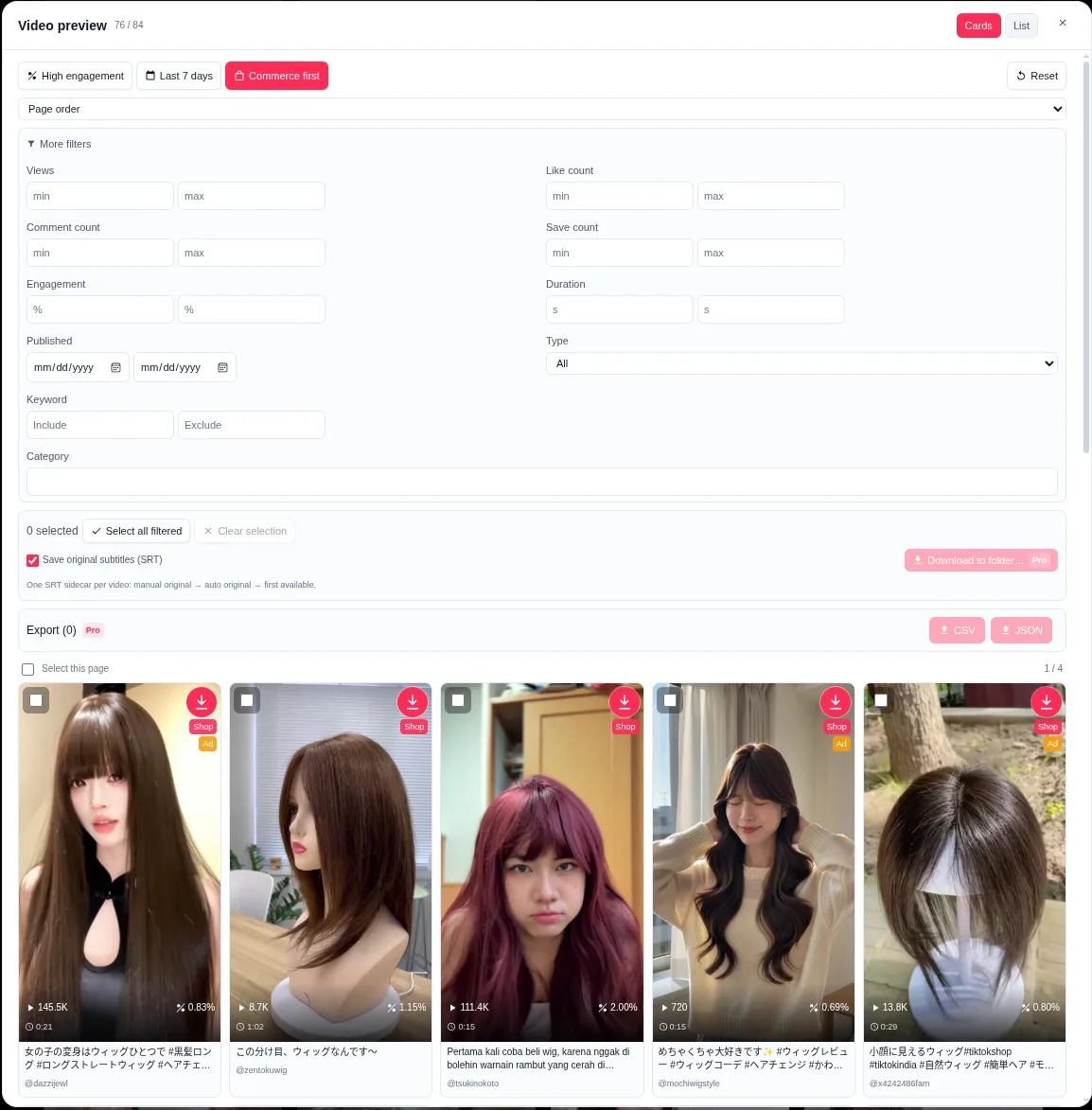
Product preview
Overlay context, then the detail behind it.
The page overlay gives you quick context. The panel gives you the list, the sample analytics, and the product anchors in one place.

How it works
Four steps, all on the page you opened.
No separate dashboard, no upload step, and no background crawl.
- 1
Open a supported public page
Go to a public Home, video, hashtag, search, profile, Explore, or music list page. No TokGrid account is required for core use.
- 2
Let TokGrid read what is already rendered
The extension reads the cards the page has loaded, using read-only page data. It does not intercept network requests or call TikTok APIs to collect data.
- 3
Filter, sort, and review the sample
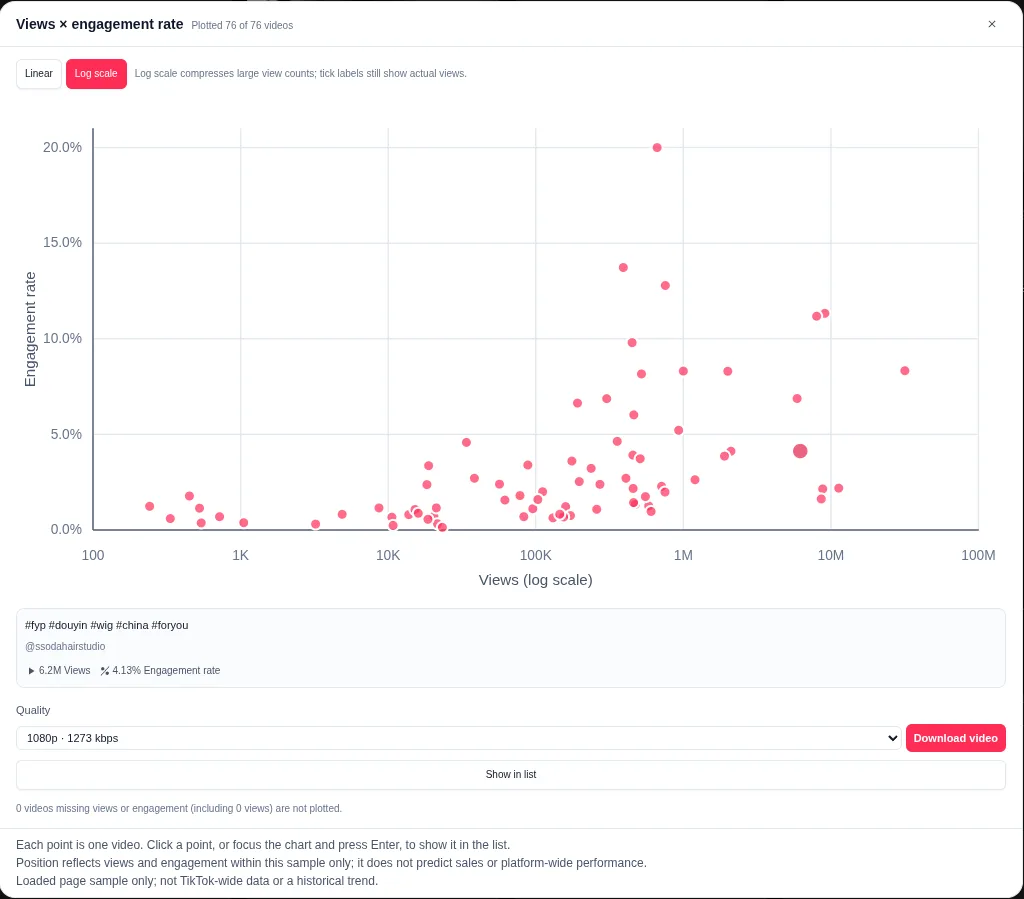
Use the Data and Stats tabs to narrow the list, compare medians and coverage, and inspect product anchors without leaving the page.
- 4
Download or export what you need
Save a single video or subtitle for free. Pro adds batch downloads, selected-video CSV/JSON export, and product data export.
Use cases
Built for people who work with public content.
TokGrid is for sellers, product researchers, content marketers, creators, and analysts who need a cleaner sample before they make a decision.
Competitor content research
Open a competitor profile, hashtag, or search result and compare the videos that are actually loaded in the page sample.
Creator performance research
Review medians, coverage, posting frequency, and interaction composition for the creator content visible on the page.
Product discovery
Organize product anchors by category, seller, and SKU count to understand which products appear around a topic.
Content trend analysis
Use filters, rankings, and engagement structure to study patterns inside a page sample, without treating it as platform-wide data.
Free and Pro
Start with the free core. Upgrade for batch work.
Pro is a paid upgrade. Current plan details are available in the extension; this page does not display subscription pricing.
| Capability | Free | Pro |
|---|---|---|
| Page overlay and hover details | ||
| Data list, filters, sorting, and preview | ||
| Sample analytics, Top 10, scatter, and content views | ||
| Product research and category distribution | ||
| Single video and single subtitle downloads | ||
| Batch downloads with optional SRT sidecar | — | |
| Selected-video CSV/JSON export | — | |
| Product data CSV/JSON export | — |
Core features do not require an account. Pro activation uses the extension’s subscription flow. Feature availability depends on what the public page exposes.
Local-first by design
Page data stays in your browser.
TokGrid processes the public page data it can read locally. Subscription validation is a separate, narrowly scoped license check. The website’s analytics is disclosed in the Privacy Policy.
Read the Privacy PolicyLocal page processing
Page data is not uploaded to TokGrid.
No request interception
No fetch/XHR override and no background TikTok API collection.
No telemetry
The extension has no analytics or telemetry.
Guides
Practical notes for public-page research.
Start with the question you are trying to answer, then use the page sample you can actually see.
How to Analyze TikTok Creator Content
Review a creator’s loaded public videos with medians, coverage, posting frequency, duration, engagement composition, and a content-audit workflow.
How to Analyze TikTok Video Performance
A practical workflow for reviewing the public TikTok videos already loaded on a page, using filters, medians, coverage, and limits you can explain.
How to Bulk Download TikTok Videos
How TokGrid Pro batch downloads selected public videos to a folder, with progress, failure handling, and optional original-language SRT sidecars.
FAQ
Questions, answered.
The short version of what TokGrid does, what it needs, and what it deliberately does not claim.
What is TokGrid?
TokGrid is a Chrome extension that organizes TikTok data already loaded on public pages into a filterable, reviewable list. It covers video analytics, product research, video and subtitle downloads, and structured data export.
Is TokGrid free?
Core features are free, including the page overlay, data list, filters, sample analytics, product browsing, single video download, and single subtitle download. Pro adds batch downloads, selected-video CSV/JSON export, and product data export. Pro is a paid upgrade; current plan details are available in the extension.
Does TokGrid require an account?
No account is required for core features. Pro activation uses the extension’s subscription flow and license check.
Which TikTok pages are supported?
The extension is built for public Home, For You, and Following pages; video detail pages; hashtag pages; search results; user profiles; Explore; and music detail video lists. It is intended for logged-out public pages and does not bypass login, CAPTCHA, or rate limits.
Does TokGrid collect every video?
No. It only processes cards that are already rendered on the page. Auto-load can ask the page to load more in supported lists, but it is best-effort and may stop at login walls, rate limits, page changes, or its own limits. It does not promise a complete account history or a complete TikTok database.
Can I export data?
Yes. Pro can export selected videos as CSV or JSON, with configurable fields, and can export product data as CSV or JSON. The export uses the same selected-video set as batch download. Cross-page merging and historical snapshots are not available.
Does TokGrid support bulk downloads?
Pro supports batch downloads to a folder you choose, with a three-way queue, streaming writes, progress, failure reporting, cancellation, and an optional original-language SRT sidecar. Single video and single subtitle downloads are free.
Is TokGrid affiliated with TikTok?
No. TokGrid is an independent browser extension and is not affiliated with, endorsed by, or sponsored by TikTok or ByteDance. TikTok and related marks belong to their respective owners.
What happens to my page data?
Page data is processed locally in the browser and is not uploaded. Subscription validation contacts the license server with an account identifier, token, channel, and operation type, but not page data. See the Privacy page for the full distinction.
TokGrid
Research smarter. Understand content. Discover opportunities.
Install TokGrid, open a supported public TikTok page, and work from the sample you can actually see.