
Downloads
TikTok Video and Subtitle Downloads
Save a single video in an available quality or download its subtitle tracks as VTT or SRT. On Pro, batch download the selected videos to a folder you choose.
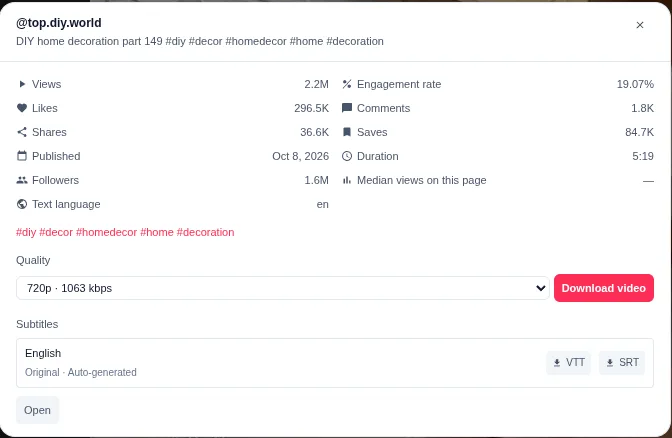
Single downloads
Save one video in an available quality, or save its original and translated subtitle tracks. Both are free.
Pro batch workflow
Select multiple videos and write them to a folder with a three-way queue, streaming writes, and progress reporting.
Subtitle sidecar
Pro can save one original-language SRT per video alongside the downloaded media.
Free and Pro
Single downloads are free. Batch work is Pro.
Pro is a paid upgrade. Current plan details are available in the extension; this page does not display subscription pricing.
| Capability | Free | Pro |
|---|---|---|
| Single video download | Yes | Yes |
| Single subtitle download | Yes | Yes |
| Available video qualities | Yes | Yes |
| Batch download to a chosen folder | — | Yes |
| Three-way queue and streaming writes | — | Yes |
| Batch progress, failure list, cancel | — | Yes |
| Optional original-language SRT sidecar | — | Yes |
| Selected-video CSV/JSON export | — | Yes |
Single downloads
Quality and subtitle options, where available.
The download controls appear only when the page exposes a playable source or subtitle track.
- Choose from the available video qualities; the highest resolution is selected by default.
- When resolutions tie, the highest bitrate is preferred.
- Download original and translated subtitle tracks as VTT or SRT.
- If the primary subtitle source fails, TokGrid can try a backup source exposed by the page.
- Filename templates can be adjusted in Settings.
Availability is determined by the page. A video can have no playable source, and a subtitle track can be absent even when the video is playable.
Batch downloads
A queue that writes directly to your folder.
Pro batch download asks for a destination folder, then writes selected videos with streaming writes instead of holding whole files in memory.
- Three-way concurrent queue with overall and per-item progress.
- Per-item failures are reported without stopping the rest of the queue.
- Cancel control and a failure list for follow-up.
- Optional original-language SRT sidecar for each video.
- Selection is shared with the Pro CSV/JSON export workflow.
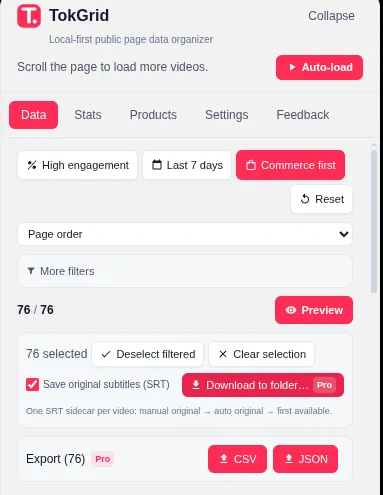
How to download
Select, choose a folder, and monitor the queue.
A practical workflow for a Pro batch download.
- 1
Select the videos
Use filters and sorting to narrow the list, then select individual rows or all current filtered candidates.
- 2
Start batch download
Choose batch download, then select a destination folder in the browser prompt.
- 3
Choose subtitle sidecars
If you want subtitles with the videos, enable the original-language SRT option before starting.
- 4
Monitor progress
Watch the overall and per-item progress. Failed items are listed separately and can be retried.
- 5
Review the folder
Confirm the files are present and playable. Use the content only when you have the rights to do so.
Only download content you have the rights to use.
Follow applicable law, TikTok’s terms, and the content owner’s permissions. TokGrid does not provide legal permission and does not bypass access controls, DRM, or other restrictions. Availability is not the same as authorization.
Limits
What to expect when a download is not available.
Not every video has a playable source. Only videos with an available address can be downloaded.
Available qualities depend on the page data. TokGrid selects the highest available resolution, then the highest bitrate.
Not every video has subtitles. Original and translated tracks appear only when the page exposes them.
TokGrid does not bypass login, CAPTCHA, DRM, or other access controls.
Batch download requires Chrome 111 or newer and a folder you choose through the browser permission prompt.
A failed item is reported individually; it does not stop the rest of the queue. URLs can expire, so refresh and retry if needed.
FAQ
Download questions.
Can I download every video with TokGrid?
No. Only videos with a playable address in the available page data can be downloaded. Some videos have no playable source, and the available qualities depend on what the page exposes.
What is free and what requires Pro?
Single video download and single subtitle download are free. Batch downloads, selected-video CSV/JSON export, and product data export require Pro.
Which subtitle formats are supported?
Subtitles can be saved as VTT or SRT. Original-language and translated tracks are supported when available. The extension falls back to a backup subtitle source when the primary URL fails. Not every video has subtitles.
What does batch download do?
On Pro, batch download writes selected videos to a folder you choose using a three-way queue and streaming writes. It shows total and per-item progress, reports failures, supports cancellation, and can optionally save one original-language SRT per video.
Can I use TokGrid to bypass access controls?
No. TokGrid does not bypass login, CAPTCHA, DRM, or other access controls. Only download content you have the rights to use, and follow applicable law, TikTok’s terms, and the content owner’s permissions.
Why do I need Chrome 111 or newer?
Batch download uses the File System Access API to write into a folder you choose. The extension sets Chrome 111 as its minimum supported version.
TokGrid
Download a single video for free, or batch the workflow on Pro.
Install TokGrid and open a supported public page. Only download content you have the rights to use.