
How to Export TikTok Video Data to CSV
Build a selected-video set, choose export fields, and produce a CSV or JSON file from a public TikTok page sample with TokGrid Pro.
On this page
A CSV export is only as good as the selection behind it. If the list mixes pages, filters, or missing fields without a record of what happened, the file looks precise while being hard to defend. TokGrid’s export workflow is intentionally tied to the selected-video set so the file and the download queue refer to the same records.
This guide covers the selection rules, the field configuration, the difference between CSV and JSON, and the checks worth doing before you share the file.
Step 1: Build a selection you can explain
The export uses the same selected-video set as batch download:
- Videos selected from the current filtered candidates.
- Selections retained when a filter changes.
- The same records used by the batch download action.
This shared selection is useful because it prevents a common mismatch: downloading one set and exporting a different one. It also means the selection is the source of truth. If the selection is unclear, the export will be unclear too.
Before exporting, decide:
- Which page produced the sample?
- Which filters were active?
- Did you select individual rows or all filtered candidates?
- Did any selections survive a filter change?
- Is the sample size defensible for your purpose?
TokGrid does not merge selections across pages, tabs, or browsing sessions. A cross-page deduplicated merge is not part of this build.
Step 2: Configure the fields
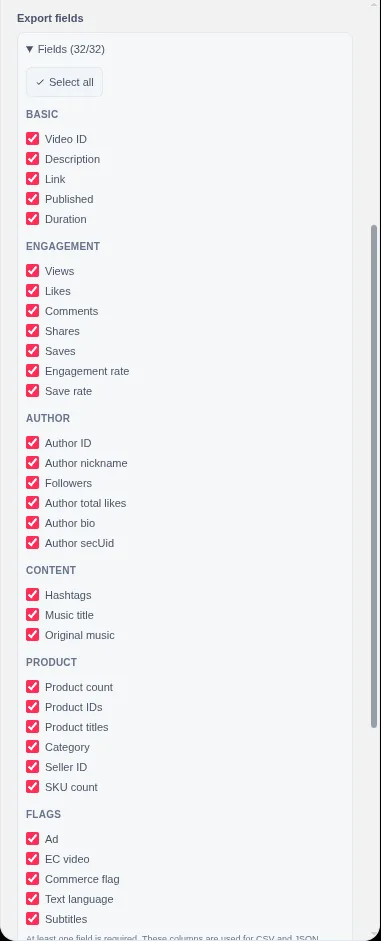
Export fields are configured in Settings. The same field selection is used for CSV and JSON. The groups are:
- Basic: video ID, description, URL, published time, duration.
- Engagement: views, likes, comments, shares, saves, engagement rate, collect rate.
- Author: author ID, nickname, followers, total likes, bio, secUid.
- Content: hashtags, music title, original-music flag.
- Product: product count, IDs, titles, category paths, seller IDs, SKU counts.
- Flags: ad, commerce, EC-video, text language, subtitle languages.
Choose the smallest set that answers your question. A file with 30 columns is harder to review than a file with 10, and every additional field is another place for a missing value.
Step 3: Choose CSV or JSON
CSV is a flat table. TokGrid writes a header row, a UTF-8 BOM, and CRLF rows so spreadsheet applications can open the file more reliably. Cells with commas or line breaks are quoted. Missing values are left blank.
JSON is an array of objects with stable field names. It is more convenient for a script, notebook, or database import. Missing values are represented according to the field type, including null where appropriate.
Neither format includes sales, revenue, advertising spend, historical trends, or platform-wide statistics. The file contains the records and fields you selected.
Step 4: Export and check the file
- Open the Data tab or a preview.
- Confirm the selection count.
- Choose CSV or JSON.
- Save the file locally.
- Open it in a spreadsheet or inspect it in a script.
- Check the header, row count, and a few known records.
- Confirm that missing values are blank or null rather than invented.
- Store the page URL, capture date, filters, and field list next to the file.
A quick row-count check catches many selection mistakes. If you selected 20 videos and the file has 200 rows, the selection or the filter scope is probably not what you expected.
A field-selection guide by question
| Question | Useful fields |
|---|---|
| Which videos got the most reach? | Video ID, URL, description, views, published time |
| Which videos had the strongest interaction efficiency? | Views, likes, comments, shares, saves, engagement rate |
| Which creator posted the sample? | Author ID, nickname, followers, total likes |
| What content themes appear? | Description, hashtags, music title |
| Which products appeared? | Product IDs, titles, category paths, seller IDs, SKU counts |
| Which videos were ads or commerce content? | Ad flag, commerce flag, EC-video flag |
| What language or subtitle context exists? | Text language, subtitle languages |
This table is a starting point, not a fixed template. The right fields depend on the decision the file is meant to support.
Data hygiene
An export is easier to trust when it carries its own context. Keep a small companion note or a second sheet with:
- Source page URL.
- Capture date and time.
- Page type.
- Filters applied.
- Selection method.
- Sample size.
- Valid coverage for key metrics.
- Field list or configuration version.
- Known missing fields.
If you are combining files from multiple dates, keep them separate first. Do not overwrite the raw export with a cleaned version. Cleaning decisions are easier to audit when the original is still available.
Common mistakes
- Exporting before defining the sample. A file without a page and date is hard to reproduce.
- Assuming the file is platform-wide. It contains selected records from a page sample.
- Treating blank cells as zero. A blank means missing, not zero.
- Mixing exports from different dates. The metrics are page snapshots.
- Including fields you will not use. More columns increase review and error risk.
- Assuming CSV is an Excel integration. It is a file format that spreadsheet software can open.
- Forgetting Pro scope. Selected-video CSV/JSON export and product data export are Pro features.
What export cannot do
TokGrid does not merge pages, deduplicate across a browsing session, store historical snapshots, calculate trends, estimate sales, or fill missing product fields. It does not upload the file to a server, and it does not send the export to a third-party spreadsheet service.
The export is a local file generated from the records you selected. That is a deliberately narrow promise.
A short pre-export checklist
- ☐ The page and capture date are recorded.
- ☐ The filters are known.
- ☐ The selection count is visible.
- ☐ The field list is intentional.
- ☐ The format matches the next tool.
- ☐ The row count is plausible.
- ☐ Missing values are understood.
- ☐ The file is stored with its source notes.
Where to go next
For the sample workflow behind the selection, read How to Analyze TikTok Video Performance. To build the selection in the preview without losing filters or sort, read How to Preview, Sort, and Filter TikTok Videos. For product context, read How to Find TikTok Products by Category. For the Pro download workflow, read How to Bulk Download TikTok Videos. The Data Export feature page lists the field groups and formats.
A note on scope
This guide describes TokGrid’s behavior on public TikTok pages. Page data is processed locally; the extension does not promise complete account histories, platform-wide statistics, sales figures, or access to non-public content.