
How to Find TikTok Products by Category
Use product anchors on public TikTok pages to review category paths, seller IDs, SKU counts, and product IDs without mistaking the sample for a shop database.
On this page
“Find TikTok products by category” can mean very different things. A seller may want a category map of a niche. A content researcher may want to know which products appear around a topic. A product researcher may want a shortlist of product IDs and sellers to review elsewhere.
TokGrid supports the last kind of work: it organizes the product anchors attached to public videos you have loaded. It does not provide a complete TikTok Shop catalog, and it does not estimate sales. This guide shows what the Products tab can do and how to use it without overreading it.
Product anchors are the source
A product anchor is product information attached to a video. Depending on the page, it can include a title, category path, seller ID, SKU count, cover image, product ID, SEO link, and a displayed price. TokGrid organizes those fields when they are present.
This is fundamentally different from a product database:
- A database would claim broad catalog coverage.
- A page sample describes the products attached to the content you loaded.
- A category distribution describes how those loaded products are distributed.
The distinction matters for every conclusion. A category with many loaded products is not necessarily a large market. It may simply be a category that appears often in the page sample you chose.
Open a page with product context
Product data is most likely to appear on supported public pages where videos carry product anchors. That can include video detail pages, profiles, search results, or other supported page types. Not every video has a product anchor, and not every anchor exposes every field.
Once the page has rendered, open the Products tab. TokGrid shows a deduplicated product list rather than counting every repeated anchor as a separate product. That makes the list easier to review.
Review the fields that are actually available
The Products tab and product detail view can expose:
- Product title.
- Category path built from the available levels, up to three; it may be shorter or empty.
- Seller ID.
- SKU count.
- Cover image and a deduplicated gallery.
- Product ID.
- SEO link.
- Page-displayed price.
- Related videos when the page exposes them.
The price field deserves special caution. It is a page-displayed value. A zero may mean “not available,” “not loaded,” or a genuine display state; it is not a reliable signal of the real price. Do not rank products by price unless you have verified the value elsewhere.
Use category distribution as a sample map
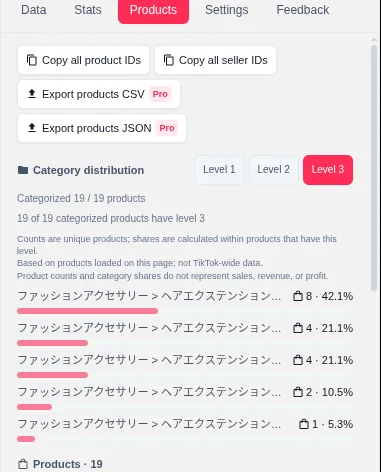
The category distribution view supports first-, second-, and third-level categories. It uses the Products tab’s loaded, deduplicated products. Products that are uncategorized or lack the selected level are counted separately rather than silently folded into a category.
Use it to answer questions such as:
- Which high-level categories appear most often in this sample?
- Does the sample have a deep third-level structure, or are many products only partially categorized?
- How many loaded products are uncategorized?
- Does a topic sample cluster around one category or spread across several?
Do not use it to answer:
- How large is this category on TikTok?
- Which category sells the most?
- Which seller is winning the category?
- What is the average revenue per product?
Those questions require data TokGrid does not have.
A practical product discovery workflow
- Choose a topic, creator, or search page that is likely to include product-linked videos.
- Load a sample and confirm the Products tab has data.
- Review the product list for titles and obvious category mismatches.
- Open a product detail to check the gallery, seller, SKU count, and related videos.
- Switch category levels and note the uncategorized or incomplete counts.
- Copy the identifiers you need: product ID, seller ID, or SEO link.
- On Pro, export the product data as CSV or JSON.
- Keep the page URL, capture date, and sample definition with the export.
The output is a shortlist for further human review, not an automated buying decision.
Copying identifiers safely
Product IDs and seller IDs are useful because they are stable identifiers you can use in another tool or a spreadsheet. Copy only what you need. Avoid pasting long lists into public channels, and do not treat an identifier as a product endorsement.
TokGrid can copy a single product ID, seller ID, or SEO link, and can copy all loaded product IDs. The exact behavior depends on the current build and the product data available.
What product research cannot tell you
TokGrid does not provide:
- A complete TikTok Shop product database.
- Sales units, revenue, profit, or advertising spend.
- Seller distribution or market share.
- Conversion rate or customer acquisition cost.
- A verified price history.
- A guarantee that a product is available, legal, or suitable for your market.
- A recommendation to buy or promote a product.
It also cannot tell you whether a product appeared in a video because of a paid partnership, an affiliate relationship, or an organic choice. The anchor is a content signal, not a commercial explanation.
Data quality checks
Before you share a product shortlist, check:
- Category completeness. How many products have all three levels?
- SKU availability. How many records have a usable SKU count?
- Price reliability. How many prices are zero or missing?
- Duplicates. Does the deduplicated list match the anchor count you expected?
- Sample size. How many loaded products contributed to the distribution?
- Source context. Which page, date, and filters produced the list?
If the answer to several of these is “unknown,” the shortlist is still a starting point, but it is not a market report.
Where to go next
For competitor context, read How to Research TikTok Competitors. For a reusable file, read How to Export TikTok Video Data to CSV. The TikTok Product Research feature page explains the available fields and the Pro product export.
A note on scope
This guide describes TokGrid’s behavior on public TikTok pages. Page data is processed locally; the extension does not promise complete account histories, platform-wide statistics, sales figures, or access to non-public content.