
Product research
TikTok Product Research
See the product anchors attached to the public videos you are already reviewing. Organize category paths, seller IDs, SKU counts, and product IDs without switching to a separate database.
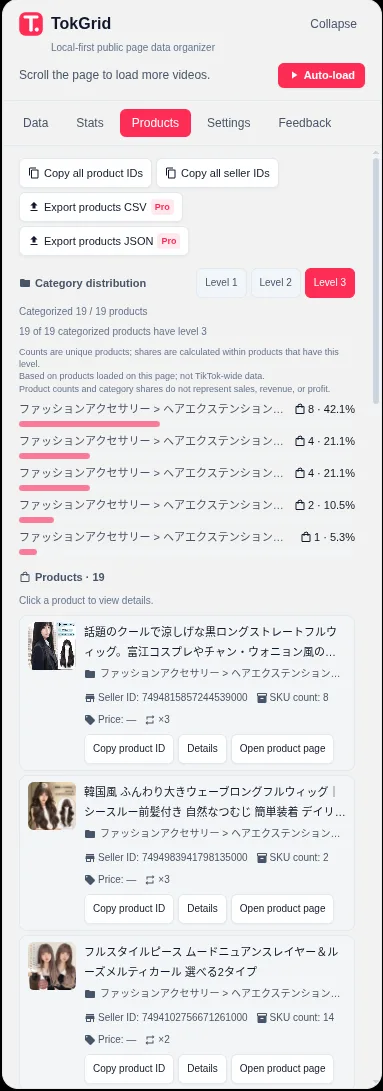
Product cards
A structured card appears when a video exposes product anchors, with the available title, category, seller, SKU, and cover fields.
Deduplicated list
The Products tab combines repeated appearances so you can review the loaded products rather than every duplicate anchor.
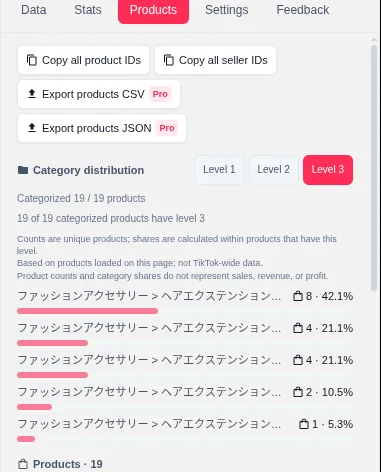
Category distribution
Switch between first-, second-, and third-level categories to see how the loaded products are distributed.
Available fields
Structure from product anchors, not a catalog.
TokGrid organizes the fields the public page exposes. It does not fill gaps with estimates or external product data.
| Field | What it represents |
|---|---|
| Product title | The title exposed by the product anchor. |
| Category path | A path built from the available category levels; it may be shorter than three levels or empty. |
| Seller ID | The seller identifier attached to the product record. |
| SKU count | The number of SKUs exposed for the product, when available. |
| Product ID | The identifier used to copy or look up the product. |
| SEO link | A product link when the page exposes one. |
| Cover and gallery | The product cover and, in the detail dialog, a deduplicated gallery. |
| Price | A page-displayed value only. Zero and empty values are not reliable price signals. |
The product detail dialog can show a gallery and linked videos. Single-item copying is free; product CSV/JSON export is a Pro feature.
Category distribution
See how the loaded products cluster.
The distribution view uses the Products tab’s loaded, deduplicated products. It is a view of the sample, not a market-size estimate.
- Switch between first-, second-, and third-level categories.
- Uncategorized products and products with too few levels are counted separately.
- Percentages use valid products at the selected level as the denominator.
- Category counts describe loaded products, not sales, revenue, or profit.
Workflow
From a video to a product shortlist.
A practical way to use the Products tab during product discovery.
- 1
Open a public page with product anchors
A video detail page, profile, search result, or other supported public page can expose product data.
- 2
Review the Products tab
Scan titles, category paths, seller IDs, and SKU counts; open a product for its gallery and linked videos.
- 3
Copy the identifiers you need
Copy product ID, seller ID, or the SEO link. Copy-all is available for the loaded product IDs.
- 4
Inspect the category distribution
Switch category levels and note how many loaded products are uncategorized or missing a level.
- 5
Export for further work
On Pro, export the product data as CSV or JSON for a spreadsheet or script.
Limits
What product research cannot tell you.
These limits matter when you compare products or brief a buying team.
Only product data already present in the public page is available. This is not a TikTok Shop database.
Category paths and SKU counts can be incomplete. Missing levels are counted separately from valid categories.
Price is a page-displayed value and may be zero, stale, or empty. It is not a verified commercial price.
The extension does not estimate sales, revenue, advertising performance, seller distribution, or profit.
Category distribution uses the loaded, deduplicated products in the Products tab. It does not represent the whole platform.
Not every video has product anchors, and not every anchor includes every field.
FAQ
Product research questions.
Does TokGrid provide a TikTok Shop product database?
No. It organizes product information that is already present in the public page data, such as product anchors attached to a video. It does not provide a complete TikTok Shop catalog.
Which product fields are available?
Available fields include product title, category path (up to three levels), seller ID, SKU count, cover image, product ID, SEO link, page-displayed price, gallery images, and related videos. Some fields may be missing or incomplete.
Is the price reliable?
The price is a page-displayed value and may be empty. A displayed zero is not a reliable indicator of the real price. Do not use it as a verified commercial price.
Can I export product data?
Yes. Product CSV/JSON export is a Pro feature. It includes fields such as product ID, title, category path, seller ID, SKU count, price, currency, source, cover URL, SEO URL, linked video IDs, and occurrence count.
Does TokGrid estimate sales or revenue?
No. It does not estimate sales, revenue, advertising performance, or seller distribution. Category distribution describes the loaded products only.
TokGrid
Research the products attached to the content you are already reviewing.
Install TokGrid and open a supported public TikTok page. Product browsing and single-item copying are free.