
Chrome extension
TikTok Video Downloader Chrome Extension
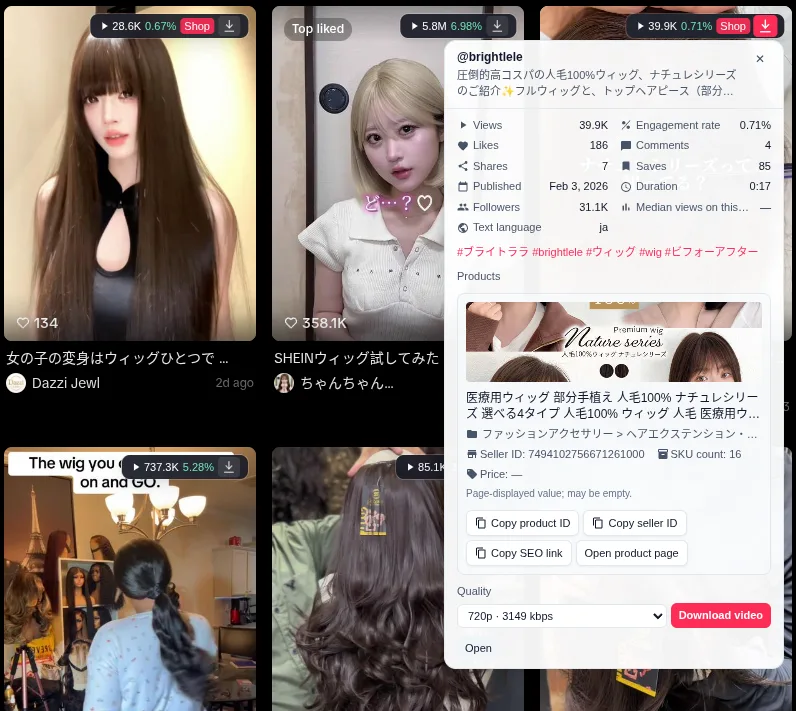
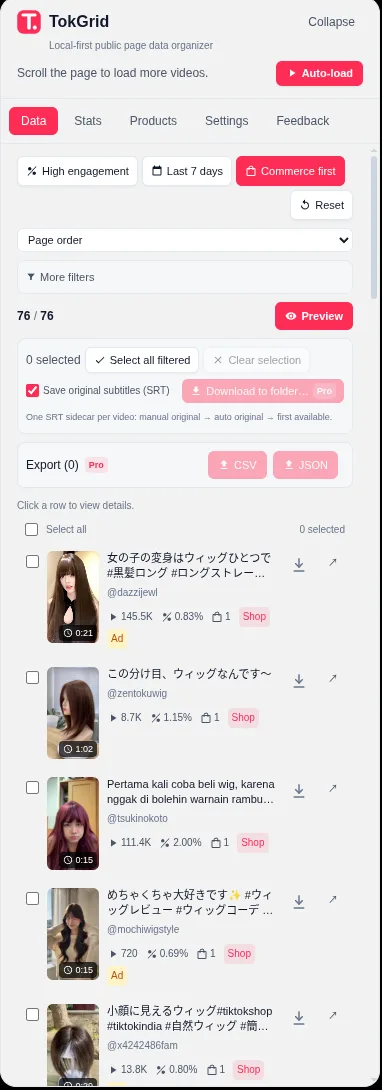
TokGrid adds a panel to public TikTok pages: review views, engagement, and product data, then download a video or its subtitles without leaving the page. Processing stays in your browser, and no account is required for core use.
- Desktop Chrome 111+
- No account for core use
- Local processing
- No telemetry
Install
Three steps, then the panel is on the page.
TokGrid is distributed through the Chrome Web Store. There is no separate installer and no account step for the free features.
- 1
Add TokGrid to Chrome
Open the Chrome Web Store listing, choose Add to Chrome, and confirm the permission prompt. The request covers extension storage and read access to TikTok page data.
- 2
Pin the icon
Open the puzzle-piece Extensions menu in the Chrome toolbar and pin TokGrid. The panel is then one click away on every supported page.
- 3
Open a public TikTok page
Go to a public video, profile, search, hashtag, Explore, or music list page. The panel appears on the right. On Home, Explore, and video detail pages it starts collapsed; use the right-edge tab to open it.
Chrome may show a permission prompt with the extension name. The exact permissions and their purpose are listed below. TokGrid is an independent third-party extension and is not affiliated with TikTok.
After install
What you actually see on the page.
The panel is attached to the public page you opened. It does not replace TikTok and it does not open a separate dashboard.
Permissions
Why it needs to read tiktok.com.
The extension reads public page data that your browser has already loaded. It does not run a background crawler and it does not upload page data.
| Requested | Why |
|---|---|
| storage | Settings, the local page snapshot, and the encrypted subscription credential. |
| *.tiktok.com | Read the cards already rendered on a public page, and request a media or subtitle URL only when you click a download control. |
| *.tiktokcdn.com, *.tiktokv.com | Fetch the media and subtitle files that the page exposes when you ask for them. |
| pandahi.cc | Subscription activation, token restore, and status refresh. It does not carry page data. |
Not requested
downloadswebRequestscriptingtabs<all_urls>Media and subtitle requests happen only after you click a download control. Subscription validation is a separate license check at pandahi.cc and does not include page data. Read the Privacy Policy.
Website vs extension
The website previews. The extension downloads.
This distinction matters: a pasted link on the website can show a TikTok player, but the file download only exists inside the extension.
| Capability | This website | TokGrid extension |
|---|---|---|
| Open a pasted video link | TikTok oEmbed player preview | Works on the TikTok page you open |
| Download a video file | No | Yes, free, no watermark |
| Download subtitle tracks (VTT/SRT) | No | Yes, free, when exposed |
| Analyze the loaded page sample | No | Yes |
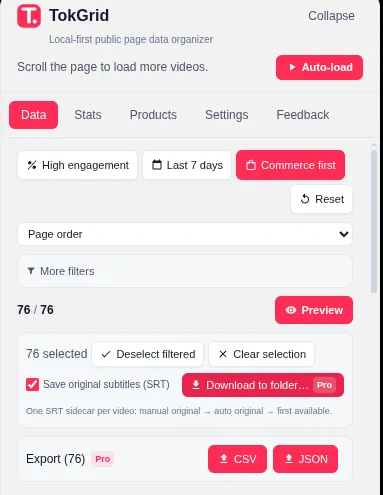
| Batch download a profile | No | Pro |
| CSV/JSON export | No | Pro |
| Runs on | Any modern browser | Desktop Chrome 111+ |
Free and Pro
Start with the free core.
Pro is a paid upgrade. Current plan details are available in the extension; this page does not display subscription pricing.
Free
Page overlay, data list, filters, sample analytics, product browsing, single video download, single subtitle download.
Pro
Batch downloads to a folder, selected-video CSV/JSON export, and product data export.
Desktop Chrome only.
TokGrid requires desktop Chrome 111 or newer. Chrome for Android and Chrome for iOS do not support extensions, so the panel cannot run on a phone or tablet. Chromium-based desktop browsers may work, but they are not officially supported.
Batch download also needs the File System Access API and a folder you choose through the browser prompt. That is a desktop browser feature.
FAQ
Installation questions.
How do I install TokGrid?
Open the Chrome Web Store listing, choose Add to Chrome, and confirm the permission prompt. Then pin the TokGrid icon from the puzzle-piece Extensions menu. Open a public tiktok.com page and the panel appears on the right.
Where is the TokGrid icon after I install it?
TokGrid installs a toolbar icon. Chrome may hide it behind the puzzle-piece Extensions menu; pin it there for one-click access. On the page itself, the panel starts collapsed on the Home, Explore, and video detail pages, so use the right-edge tab to open it.
Why does TokGrid need to read tiktok.com pages?
The extension reads the video and product cards that the public page has already rendered, using a read-only page script. It does not override fetch or XHR, does not intercept network requests, and does not call TikTok APIs in the background to collect data.
Does TokGrid upload my page data?
No. Page data is processed in your browser and is not uploaded to TokGrid. Subscription validation is a separate license check that does not include page data. The extension contains no analytics or telemetry.
Is there a web version I can use without installing anything?
The website can preview one public video through TikTok’s oEmbed player, but it cannot download a file. Downloads, subtitles, sample analytics, and CSV/JSON export run in the Chrome extension on the page itself.
Which browsers and versions are supported?
TokGrid targets desktop Chrome 111 or newer. Chromium-based browsers may work, but they are not officially supported. Chrome for Android and Chrome for iOS do not support extensions, so TokGrid is desktop only.
What is free and what requires Pro?
The page overlay, data list, filters, sample analytics, product browsing, single video download, and single subtitle download are free. Pro adds batch downloads, selected-video CSV/JSON export, and product data export. Pro is a paid upgrade; current plan details are in the extension.
Why is batch download limited to Chrome 111 or newer?
Batch download uses the File System Access API to write into a folder you choose, and the page reader uses a MAIN-world content script. Both require a modern desktop Chrome. An individual batch run is also best-effort: it uses the cards the page has loaded, up to the auto-load limits.
Does TokGrid work on private or logged-in pages?
No. TokGrid is designed for public pages that are accessible without logging in. It does not bypass login, CAPTCHA, DRM, rate limits, or other access controls.
Next step
Install once, then work on the page you already have open.
The extension reads the cards the public page has rendered, and writes downloads locally. Only download content you have the rights to use.
TokGrid
Add TokGrid to Chrome and open a public TikTok page.
Version 0.1.3. Free core features; Pro adds batch downloads and export. Desktop Chrome 111 or newer.